Usage & Costs
Usage Costs and Budgets
Use Usage to see the estimated cost of requests. Use a budget to limit the traffic assigned to that budget.
For your first gateway test, set a small API-token budget on a dedicated test token. This limits requests that use that token and is easier to verify than an organization-wide billing threshold. The quickstart budget test shows a test that uses all the token budget.
Your model provider bills you directly. Verdictan cost figures are estimates for routing, limits, and analysis.
Before you start
- Console access to Usage and the budget or API token you want to manage.
- For the CLI steps, an API token or session. Set
VERDICTAN_API_TOKEN, or sign in withverdictan auth login. - A price for each model that you use through the gateway. Verdictan uses an active administrator price override or the imported model catalog price. If neither price is available, the gateway refuses the request with
503.
Select the budget control
The word budget shows on more than one surface. Each surface stores a different record and acts on a different request path. Do not use a value in one budget view as proof about a different request path.
| Information | Surface |
|---|---|
| Current cost, tokens, and request volume | Usage |
| Cost thresholds and hard limits | Budgets |
| Provider headroom limits | verdictan spend provider-budget |
| API-token and scope budget limits | API Tokens or verdictan spend budget |
| Actual provider charges | Your provider invoice |
| Control | Configure it in | Request-path boundary |
|---|---|---|
| Budget policy | Budget Policies in the Console | Hourly, daily, weekly, or monthly limits for a user, a team, or the organization. The control plane checks each window before it authorizes a connected gateway request, and refuses a request that would exceed a window. The client receives HTTP 402 with usage_authorization_budget_exceeded. Retry-After may be present |
| Access policy per-minute limit | limits.rpm_per_token and limits.tpm_per_token in /v1/access-policies | Requests and tokens for each token in a sliding 60-second window. When more than one allow policy matches, the lowest value applies. The control plane checks the window before it authorizes a connected gateway request. Each request counts toward the request limit. A released request does not count tokens. The client receives HTTP 503 with usage_authorization_rate_limited. Retry-After may be present |
| Billing budget | Budgets in the Console | Stores cost-governance thresholds, alert settings, and the hard-limit state. Verify that the deployment path applies the gateway block |
| Scope spend budget | verdictan spend budget or /v1/budgets | Tracks organization, team, user, or key spend. A standalone gateway with an event sink can use the remaining amount. A connected gateway does not load scope budgets for routing |
| Provider budget | verdictan spend provider-budget | Used in the provider-headroom check for configured gateway traffic. The target must have pricing metadata |
| Governed API-token budget | API Tokens or verdictan token create --max-budget | The API checks depletion for each request that uses the token |
A Verdictan budget limits traffic that goes through Verdictan. It does not limit spend at the provider. If you must have a financial limit, set it in the provider console.
Read cost in Usage
- Open Usage.
- In Time, select a listed period or set the report time range.
- In Granularity, select Daily or Weekly.
- In Group by, select Model, Provider, Agent, User, API key, Workflow, or Cache outcome.
- Add Filters to limit the results.
- Compare the trend with the rollout dates from Configurations to find cost increases after a change.
- To give the results to a different team, use Exports.
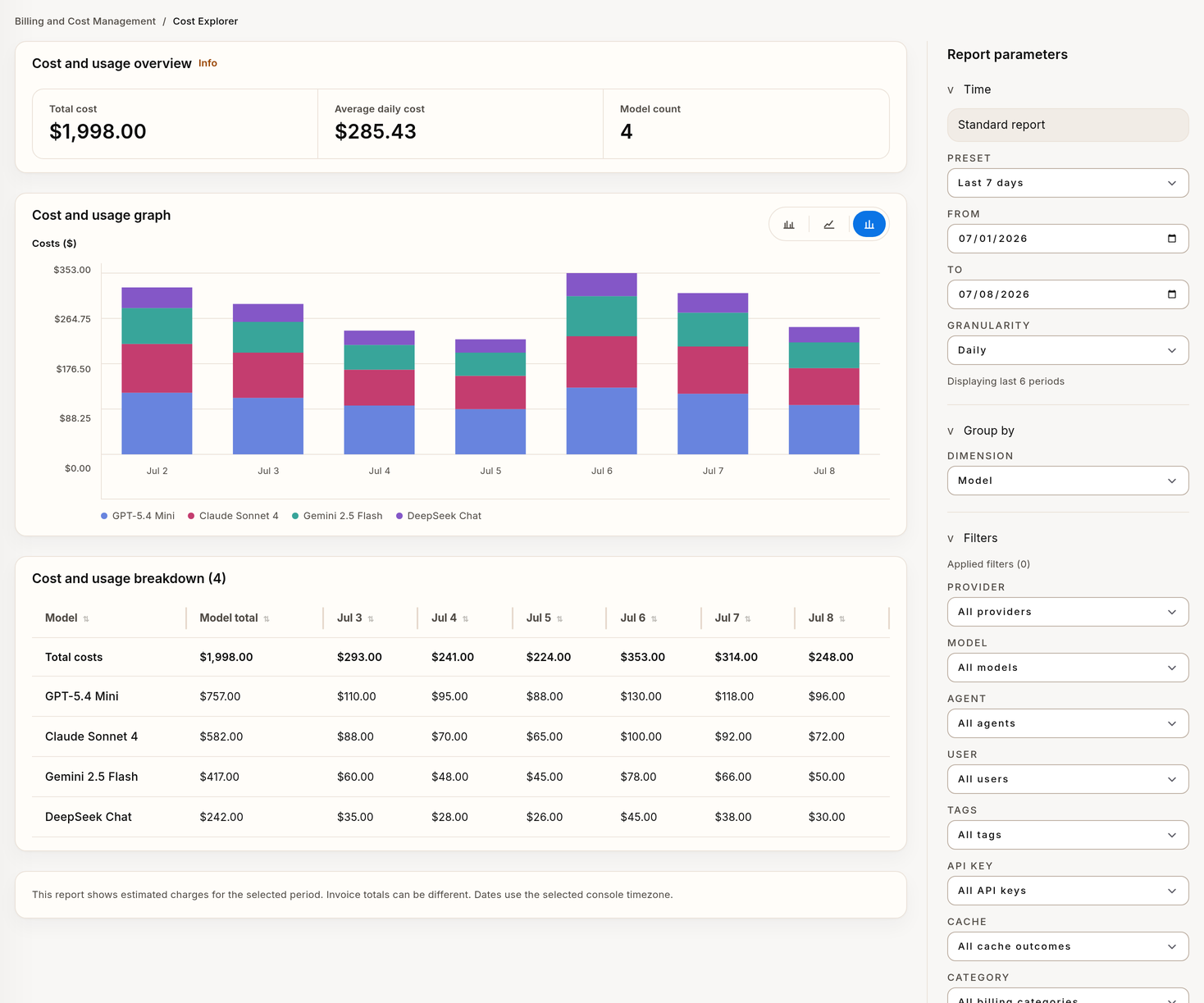
Cost amounts in Usage come from token counts and the unit prices that Verdictan freezes for each request. They are estimates, not invoices. Verdictan calculates each estimate in this sequence:
- The gateway estimates the token count before dispatch.
- Verdictan selects the unit prices. An active administrator price override has priority. If there is no override, Verdictan uses the imported model catalog price for the same provider and model.
- Verdictan freezes the unit prices in a pricing snapshot. Each snapshot has an identifier. A snapshot with a catalog price records the source
catalogand the catalog version. - If neither price is available, the control plane refuses the usage authorization with the error code
usage_authorization_budget_estimate_unavailable. The gateway then refuses the request with503. - Verdictan calculates the estimated cost for the usage authorization.
- After the response, Verdictan records the token counts. If the provider returns no usage, Verdictan records an estimate of the input and output tokens and marks the record
usage_estimated. With gateway 0.1.26 or later, this also applies when an output policy blocks or escalates the response. After a block in a stream, the gateway reads the remaining provider stream for a maximum of 30 seconds to get the provider usage. - Verdictan writes one spend log row with the calculated cost, the provider, the model, the token counts, and the attribution.
Cache reads use the cached-input price. Anthropic cache writes use the cache-write price. If a cache price is not available, Verdictan uses the input price. Verdictan rounds each cost component to 9 decimal places. Verdictan does not apply reasoning, audio, batch, service-tier, or regional prices.
Verdictan calculates each cost in USD. Usage shows the cost in the organization currency with the current USD exchange rate, not the rate on the request date. If no exchange rate is available, Usage shows USD.
New spend log rows record byok as the credential origin. Rows from the retired platform-managed access mode keep their initial label. Use the pricing snapshot identifier to identify the cause of a historical estimate.
Set a billing budget in the Console
- Open Budgets.
- Select Create budget.
- Type a Name.
- In Scope, select Organization, Team, User, or Agent.
- Set the Threshold amount in the organization currency.
- Set Alert thresholds (%).
- Select the Budget window.
- For a weekly or monthly period, set Week start day or Month anchor day.
- Set the Timezone.
- For a hard limit, select Enable hard limit.
- Set the Hard limit amount.
- Select Create budget.
These steps store the budget and alert configuration. They do not verify notification delivery.
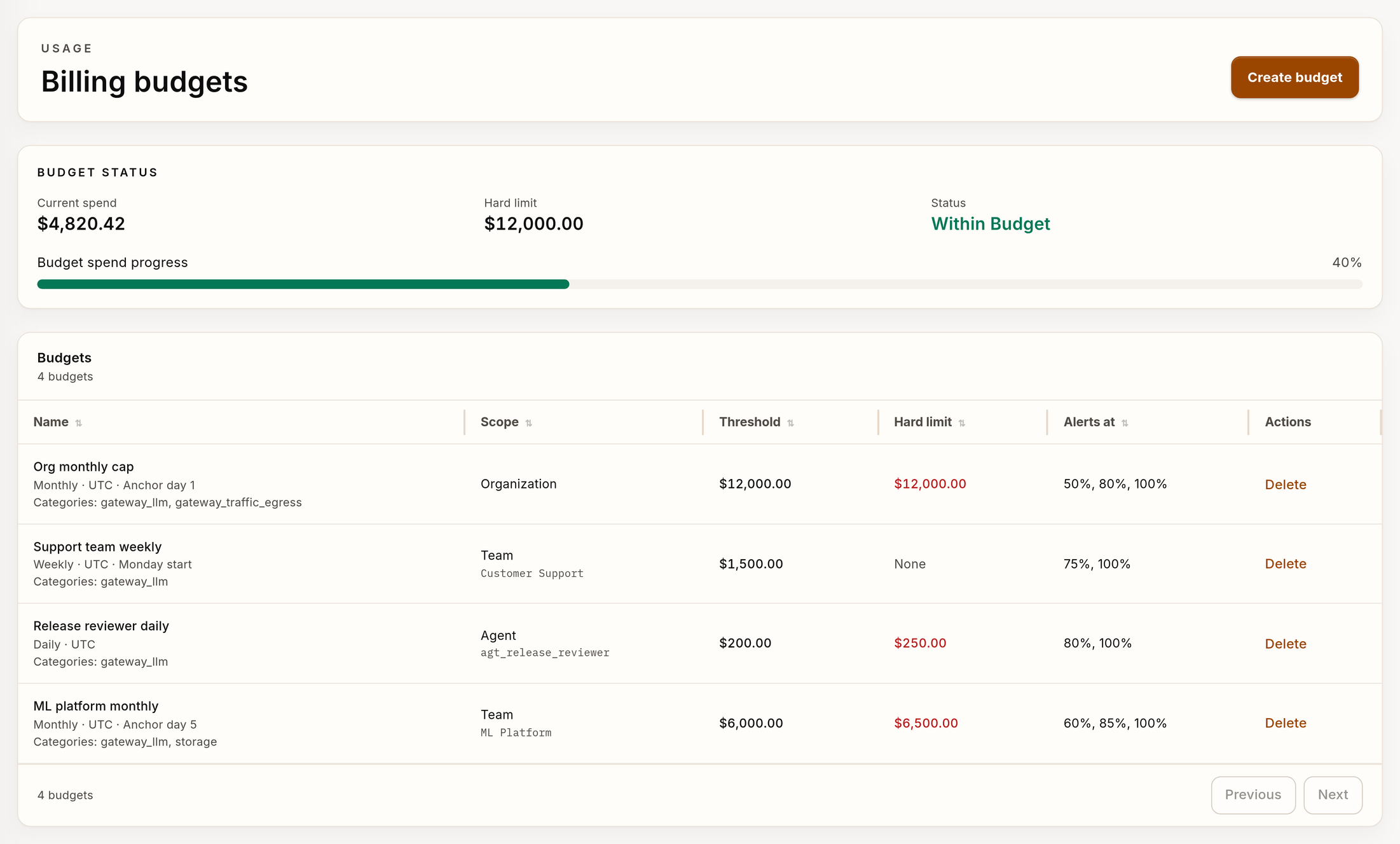
The budget list shows Name, Scope, Threshold, Hard limit, Enabled, and Alerts at. The status card shows Within Budget or Limit Exceeded. Do a test of the request path before you use a hard limit to protect traffic. Budget thresholds do not create an Inbox notification. See Notifications.
Set a provider budget or a scope budget with the CLI
To limit the provider headroom for configured gateway traffic, create a provider budget:
verdictan spend provider-budget create --provider openai --limit-usd 5000 --reset-schedule monthly
verdictan spend provider-budget list --json
To track spend for an organization, a team, a user, or a key, create a scope budget:
verdictan spend budget create \
  --name "Support Team" \
  --max-budget 2000 \
  --target-type team \
  --target-id <team-id> \
  --alert-threshold-pct 70
See Spend, Budgets, and API Tokens for each option and for the token budget flag --max-budget.
Reset a budget on a schedule
A scope budget and a provider budget accept a reset schedule of never, daily, weekly, or monthly. The API rejects any other value with 422. A budget without a schedule does not reset.
- Periods are in UTC. A daily period starts at 00:00 UTC, a weekly period on Monday, and a monthly period on the first day of the month.
- A provider budget can set
reset_atin/v1/provider-budgets. That time is the next reset and the anchor for later periods. A monthly anchor on a day that a month does not have, such as the 31st, ends that month's period on its last day. - When a period ends, the budget shows zero spend immediately.
Verify
- In Usage, make sure that the provider, model, and attribution match the test request.
- In Budgets, make sure that Scope, Threshold, and Alerts at show the values that you set.
- For a provider budget, send one allowed request through the gateway.
- In a test environment, send a request that exceeds the provider budget.
- Make sure that the gateway blocks the request.
- For a governed token, run
verdictan token get <id> --json. - Examine the budget binding.
- With a test token that has a small limit, send a request that exceeds the token budget.
- Make sure that the gateway blocks the request.
A saved budget record does not verify enforcement. Do these tests before you use a budget to protect traffic.
Use the provider invoice for accounting. Use Verdictan values for engineering attribution, budget control, and trend analysis. A Verdictan amount can be different from the provider amount because the estimate excludes provider discounts, committed-use contracts, taxes, and rounding.
Troubleshooting
| Symptom | Cause | Action |
|---|---|---|
| A request fails with a spend or budget error | A token limit, a budget policy window, a scope budget, a provider headroom limit, or an authorization policy stopped it. A budget policy window or a token allowance returns HTTP 402 with usage_authorization_budget_exceeded | Preserve the response code, the error code, the request ID, the token ID, the provider, and the model. Find the owning control before you send the request again |
A request fails with 503 and usage_authorization_rate_limited | The token reached a per-minute request or token limit of an access policy | Wait for the time in Retry-After when it is present, then send the request again. To allow more traffic, raise the lowest rpm_per_token or tpm_per_token among the matching access policies |
A request fails with 503 and the gateway log shows usage_authorization_budget_estimate_unavailable | Verdictan has no price override and no catalog price for the provider and model | Ask a platform administrator to add a price override for the model. You can also use a model that has a catalog price |
| A scope budget does not stop connected gateway traffic | A connected gateway does not load scope budgets for routing | Use a provider budget, a governed token limit, or usage authorization for that path |
| The Verdictan amount is different from the invoice | The estimate excludes discounts, contracts, taxes, and rounding | Reconcile with an exported spend log slice and the invoice |
Next steps
- Spend, Budgets, and API Tokens: manage scope budgets, provider budgets, and token limits from the CLI.
- Compare Model Cost and Latency: compare models before you set a budget threshold.
- Providers and BYOK Routing: configure the provider credentials that the provider invoices.
- Config-First Workflow: correlate a cost change with a policy config rollout.