Review & Audit
Trail and Audit Evidence
Trail is the audit log of the control plane: every change to a resource, who made it, and the result, in a hash chain that you can verify. This page shows how to find a change, prove that its record is intact, and export it for a reviewer.
Trail covers control-plane actions only. Other evidence lives elsewhere:
| Where | Evidence |
|---|---|
verdictan events or GET /v1/events | Runtime decisions and request policy activity |
| History | Captured prompts and responses, when capture is on |
| Inbox | Human review items and their decisions |
| Trail | Control-plane actions, resource changes, audit chronology, and record integrity |
Before you start
- A Console user with Trail access. Trail is under Settings.
- For the CLI, a session or API token for the same organization and region:
verdictan auth login, orVERDICTAN_API_TOKEN. - Something to search for: a request ID, event ID, resource ID, or a short UTC window.
Search Trail
- Open Trail. Trail Events lists the management events of the last 90 days.
- Set Start Date and End Date to the smallest window that contains the change.
- Narrow the list with Event Category, Actor Type, Actor, Resource Type, Event Name, or Verdict.
- Turn on Read-only events only only to look at reads. Leave it off when you investigate a change.
- Select a row to open the record.
Lookup attributes lists Access key, but the Console does not filter on it. Use the actor, resource, and event fields.
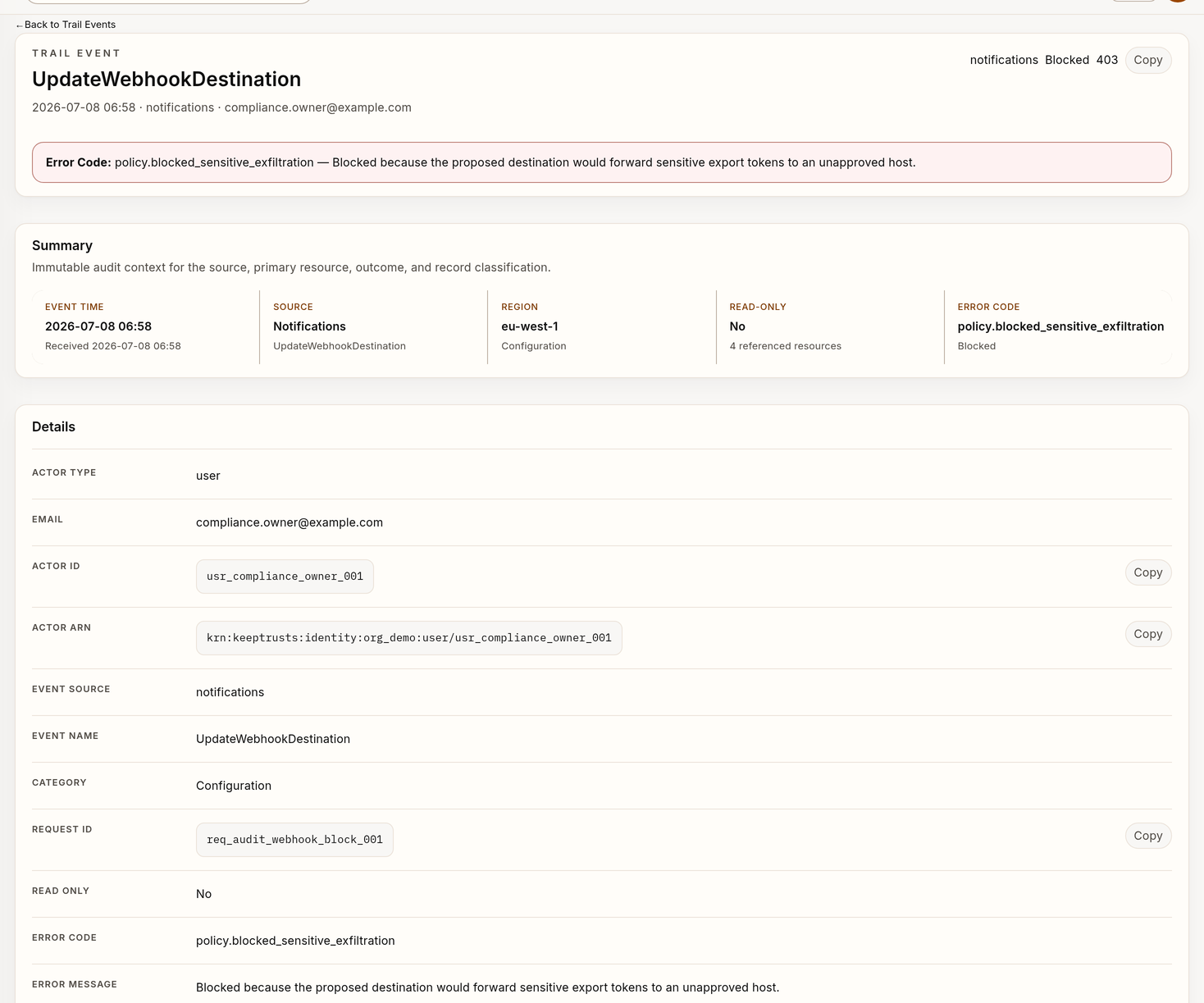
Fields in a Trail record
Fields vary by event type, and a missing optional field does not mean the activity did not happen.
| Section | Fields |
|---|---|
| Event record | Event ID, Sequence Number, Record Hash, Previous Hash, Trail Version, Event Time, Received Time, Duration, Event Source, Event Name, Category, Read Only |
| Actor | Actor Type, Actor ID, Actor ARN, Email |
| Resource | Resource Type, Resource ID, Resource ARN, Affected Resources |
| Request context | Method, Path, Request ID, API Version, Response Status, Response Time, Response Size |
| Source & Network | Source IP, Peer IP, User Agent, Forwarded Chain, TLS Version, TLS Cipher, API Client, API Key Prefix |
| Policy Verdict | Verdict, Policy, Policy Version, Rule Index |
| Change Record | Before and After values, Error Code, Error Message |
Reconstruct a change
- Start from the Resource ID or Request ID.
- Confirm the actor, organization, region, and UTC time.
- Compare the Before and After values under Change Record.
- Note the roles, policies, agents, gateways, or other resources that the record refers to.
- Read Response Status, Error Code, and Error Message.
- Follow only the neighboring events that belong to the same operation.
- For runtime decisions in the same window, run
verdictan events tail --since <window> --json. - If the review covers customer traffic and capture is on, look in History separately.
Trail records the operation, not the final state. After a successful request, check the resource on its own detail page.
Verify the record integrity
Sign in to the CLI with an account that can read Trail for the organization, and use your own organization ID and dates:
verdictan trail verify \
  --org-id <org-uuid> \
  --start-time 2026-07-01T00:00:00Z \
  --end-time 2026-07-08T00:00:00Z \
  --deep \
--json- Without
--deep, it checks the stored digest links in a non-empty window. - With
--deep, it recalculates every record hash and checks sequence numbers and previous-hash links. The archive segments of the window must exist. - With
--event-id <id>, it checks only the recorded hash of that event.
It exits nonzero for a hash or link mismatch, a sequence gap, an empty window, or window limits that are equal or reversed.
Verify an external signed receipt
If your deployment publishes Merkle-root anchors to immutable storage that you control (s3_object_lock or filesystem_worm), verify a downloaded signed receipt:
verdictan trail verify \
  --org-id <org-uuid> \
  --anchor-receipt ./anchors/<org-uuid>/2026/08/01/14.json.dsse
The CLI fetches the Trail Ed25519 public key, verifies the DSSE envelope, and recalculates the Merkle root from the leaf hashes in the receipt. It reports the backend, storage key, and window. Add --start-time and --end-time to also check the API chain for that period.
A receipt proves the records and hashes in its scope. It does not prove that every gateway request was captured or that all storage is protected.
Export the evidence
There are two export paths, with different contents:
| Path | Contents | Filters |
|---|---|---|
Evidence exports in the Console (/trail?view=exports) | Decision events as CSV or JSON, or the compliance formats EU AI Act (AESIA), AEPD, ENS, and All compliance | Start date, End date, and format only. Trail list filters do not carry over. |
verdictan trail export | Trail records as JSON, JSON Lines, or CSV | --start-time, --end-time, --event-source, and --event-name |
Export Trail records with the CLI:
verdictan trail export \
  --org-id <org-uuid> \
  --start-time 2026-07-01T00:00:00Z \
  --end-time 2026-07-08T00:00:00Z \
  --output evidence.jsonl
In the Console, open Evidence exports, choose the dates and format, and select Request export job. When the job is done, compare its integrity.artifact_sha256 with the SHA-256 of the downloaded file. For All compliance, also read GET /v1/exports/jobs/{job_id}/manifest. Export Evidence for a Review has the full procedure.
Verify
A complete evidence packet has:
- The purpose and the review owner
- The organization, region, and UTC window
- The filters or command parameters
- The event, request, actor, and resource IDs
- The configuration or rollout version, if the change relates to one
- The full
verdictan trail verifyoutput - The digest and protected location of the exported file
- Every known gap or missing field
- The conclusion and the next owner
Copy as little request or response content as you can. Never include credentials, one-time secrets, payment data, or unrelated personal data.
Troubleshooting
| Problem | Possible cause | Action |
|---|---|---|
trail verify reports a gap or failure | A record, link, or sequence does not verify, or the window is wrong | Keep the full JSON output, check the scope, and run it again. If it persists, follow your audit integrity procedure. Never report the result as verified. |
| No record matches the search | Wrong scope, or the action did not go through the control plane | Check the organization, region, and window. Then look at runtime events and History. |
trail export exits nonzero without a file | No event matched, or the API returned an empty page with a cursor | Widen the window or drop a filter. |
| The Console export does not have the change | The Console exports decision events, not Trail records | Use verdictan trail export. |
| The command rejects the window | lookup and export accept at most 7 days, verify --deep at most 90 | Split the range. |
Trail exports contain sensitive operational metadata. Apply your access controls, encryption, retention, legal holds, reviewer logging, and deletion process. Exporting does not change the retention of the source records.
Retention
Verdictan keeps each Trail event for a maximum of 90 days. Then it deletes the event. You cannot change this limit. Verdictan keeps the signed digest files, so verify --deep can still verify the records that remain. To keep Trail events for more than 90 days, forward them to a SIEM. You can also export them with verdictan trail export before they are 90 days old.
Next steps
- verdictan trail: all options of
lookup,verify, andexport. - Export Evidence for a Review: queue, download, and verify an export.
- Reviewing Alerts and Evidence: Trail together with events, History, and Inbox.